Moody Black & White Portrait AI Prompt
A moody, editorial-style black and white portrait prompt — grab it below 👇
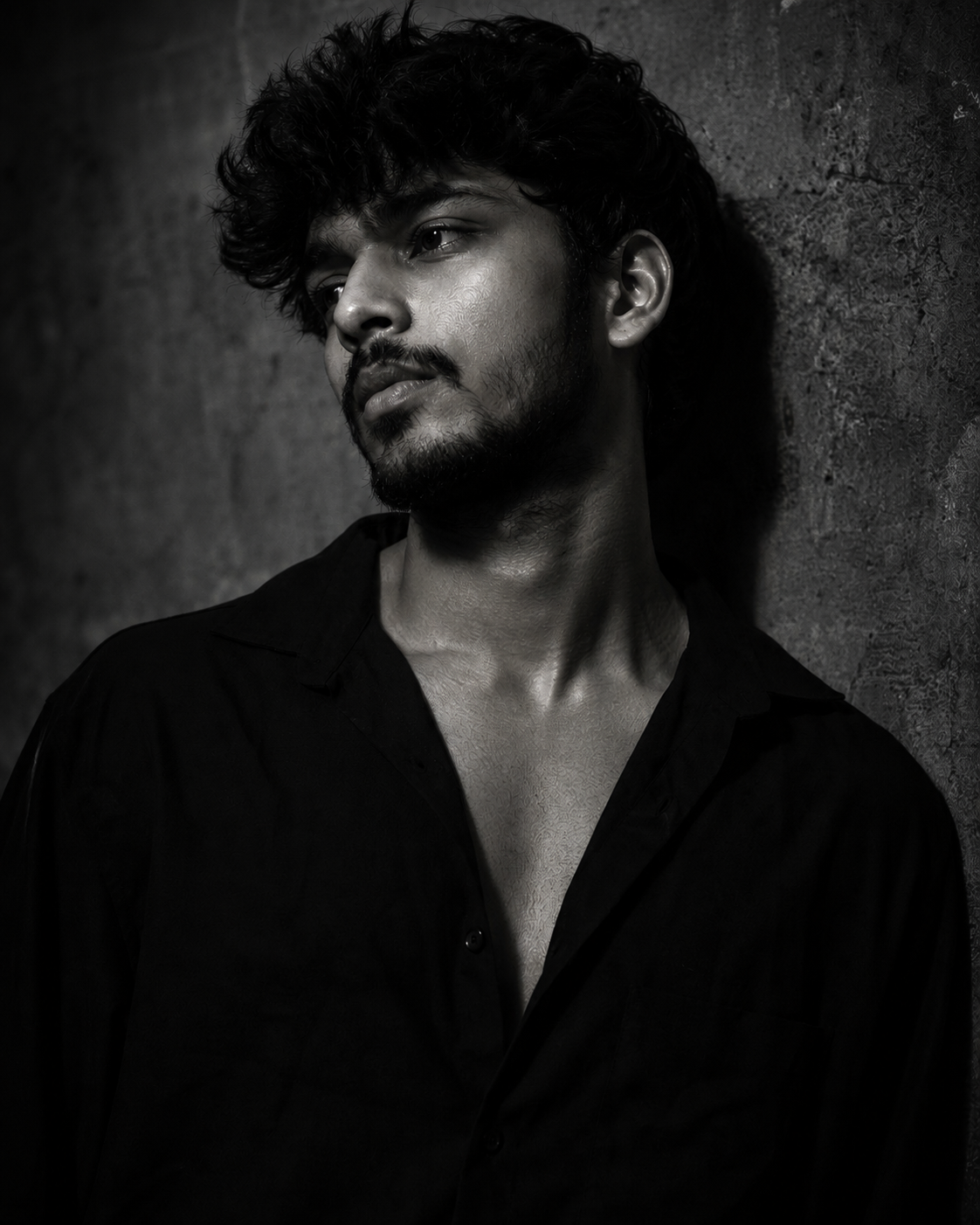
Low-key, editorial-style black and white portraits are everywhere on Instagram and Pinterest right now, the kind with deep shadows, a single soft light source, and just enough highlight on the cheekbone to feel like a fashion campaign. This prompt recreates that exact look from a normal phone photo, no studio lighting or photographer needed.
Ultra-realistic monochrome portrait with dramatic low-key lighting, deep shadows, a concrete-wall backdrop, and locked facial identity from your uploaded photo.
Why This Dark Portrait Prompt Is Trending
Low-key black and white portraits read as premium without needing an actual photo shoot, and that combination of “looks expensive, took two minutes” is exactly what spreads on social feeds. Because the shadows do most of the visual work, small imperfections in the original photo barely show, which makes the result feel more forgiving than brighter, more literal edits.
The Look This Prompt Is Built Around
The reference point is editorial fashion photography: a single hard light from one side, everything else falling into shadow, and skin texture left intact rather than smoothed away. It suits a confident, slightly mysterious mood, which is why creators reach for it for profile pictures, portfolio shots, and cover images rather than casual, everyday posts.
How to Use This Prompt
- Pick a sharp, well-lit photo where your face is clearly visible and unobstructed.
- Paste the prompt into ChatGPT or Gemini along with that photo.
- If the shadows feel too heavy or too light, ask the tool to “soften the shadows” or “increase the contrast.”
Getting the Lighting Right
The prompt asks for light from the upper front-left, so photos where your face already leans slightly toward one side tend to blend in more convincingly than a perfectly flat, front-facing shot. If the AI places the highlight in the wrong spot, mention “move the light source” and describe the side you want it on.
Tips for Better Results
- Start with a photo that already has decent resolution, since low-key lighting tends to expose blur or compression artefacts.
- If the background isn’t a concrete wall in your original photo, that’s fine, the prompt replaces it, but a plain background gives the AI less to fight with.
- Keep the outfit description in the prompt if you’re wearing something similar, or edit that line to match your own clothing for a closer match.
Dark Portrait Prompt vs Other Trending Styles
Compared to warm, golden-hour style prompts that soften a photo with glow and colour, this one goes the opposite direction, high contrast, no colour, and hard shadow instead of soft light. If your goal is a warm, approachable feed image, a golden-hour style prompt suits that better; if you want something that looks more like a magazine cover or a portfolio headshot, this low-key style is the stronger fit.
Tips to Make Your Portrait Stand Out
Since this look is being used by a lot of creators at once, a few small choices keep your version from blending into everyone else’s feed.
- Choose a pose or head tilt that feels natural to you rather than copying a reference exactly.
- Keep one small personal detail visible, like a piece of jewellery or a distinct hairstyle, so the shadow doesn’t erase everything that makes the photo yours.
- Pair it with a caption that matches the mood instead of a generic one, since the tone of the image sets an expectation for the text next to it.
Long-Tail Searches Around This Prompt
People land on prompts like this through slightly different phrasing depending on what they already know, some search “black and white AI portrait prompt,” others look for “moody concrete wall photo AI,” and some just want a dark editorial portrait without knowing the exact prompt wording yet.
Wherever you started from, the prompt above works the same way regardless of which search brought you here, just copy it in with a clear photo and adjust from there.
FAQs
Will this prompt keep my face looking like me?
Yes. The prompt is written to lock the facial identity, face shape, and features from your uploaded photo, so the lighting and grading change but the person underneath stays recognisable.
Does this prompt work with colour photos?
Yes. Start with any clear colour or black and white photo, since the prompt itself converts the final result into monochrome grading.
Which AI tools support this prompt?
It is written for ChatGPT and Gemini, and the same wording generally works on other AI image editors too.
Is this AI portrait prompt free to use?
Yes, every prompt on Prompt Screen is free to copy with no sign-up required.
Conclusion
This dark portrait prompt turns an ordinary photo into an editorial-style black and white shot without a lighting setup or an editing background. Upload a clear photo, paste the prompt into ChatGPT or Gemini, and adjust the shadow strength or light direction until it matches what you had in mind. It holds up well on its own or paired with a specific outfit or backdrop added to the end of the prompt.
If you enjoyed this prompt, explore more trending AI photo prompts on Prompt Screen and keep creating high-quality images with ease.
← Back to All Prompts